Guide 4
What is a notch teleprompter, and when does it help?
Short answer
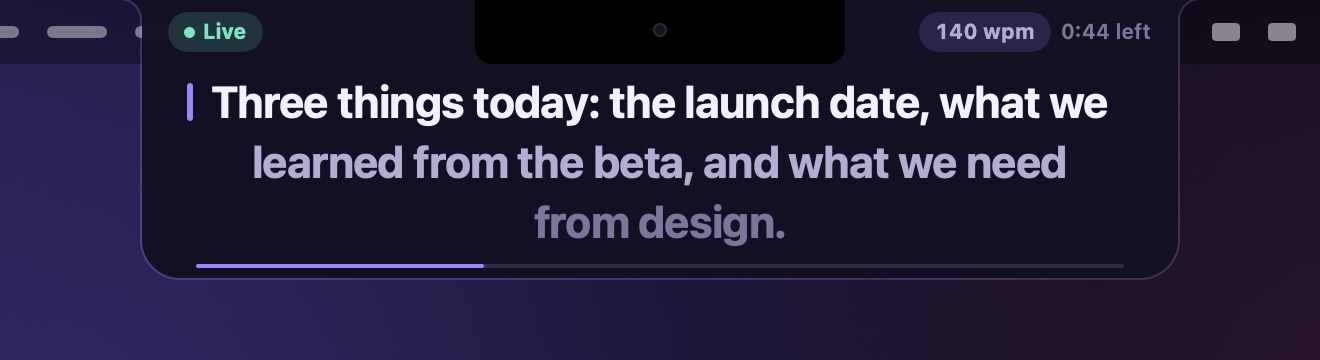
A notch teleprompter shows your script in the black area around the camera at the top of a MacBook screen, the notch, so the words sit right beside the lens instead of further down the screen. It needs no extra hardware. Unlike a glass teleprompter, the text isn’t in front of the lens, so your eyes are close to it rather than on it. On a Mac without a notch, it hangs from the top centre of the screen instead.
Updated · steps checked on macOS 27.2.1 on a MacBook Pro with a notch
What it is
MacBooks with a notch have a black cut-out in the middle of the top edge of the screen, where the camera sits. A notch teleprompter hangs a small card from that cut-out and shows a few lines of your script there. Because the text is right next to the lens, reading it keeps your eyes close to where the camera looks.
How it differs from a glass teleprompter
A classic teleprompter puts a sheet of glass at an angle in front of the camera lens. A screen below reflects the script onto the glass, and the camera films through it, so the words are exactly where the lens is. It’s the most accurate kind, but it needs a separate camera, a rig and mirrored text.
A notch teleprompter trades a little of that accuracy for having nothing to set up: it uses the Mac’s own camera and screen, and you can bring it up a moment before a call.
How the text moves
- Voice: the prompter listens and moves as you reach the end of a line, and waits when you stop. In TopCue the speech is recognised on the Mac; if your language can’t be, it tells you instead of sending audio anywhere.
- Auto: a steady pace in words per minute.
- Manual: you scroll over it, or press a hot key.
What it can’t do
- Put the words on the lens. They’re beside it. Keep to a few lines near the top, and look straight at the lens for the moments that matter.
- Show a lot at once. Two to four lines is the point. A narrower prompter also means less side-to-side reading.
- Keep the menu bar clear. While it’s showing, it covers the menu bar next to the notch.
Macs without a notch
On an iMac, a MacBook without a notch or an external display, the camera is still at the top centre, and that’s where TopCue hangs: just under the menu bar, in the middle. Choose the display in Settings › Prompter › Display.

Questions
Which Macs have a notch?
The 14-inch and 16-inch MacBook Pro from 2021 on, and the MacBook Air from the M2 model (2022) on. The 13-inch MacBook Pro, the iMac and external displays don’t have one.
Does the notch hide part of the text?
Not with TopCue: the lines start below the notch. The strip beside the notch shows only whether the prompter is live and the pace.
Does it cover the menu bar?
While it’s showing, the prompter covers the part of the menu bar on each side of the notch. Hide it when you’re done, from its close button or the TopCue menu.
Do I need special hardware?
No. A notch teleprompter works with the camera built into the Mac. A glass teleprompter needs a separate camera and a rig.
More guides