Coming soon

A teleprompter in the notch

Read every word. Look right at them.

Your script hangs from the notch, right under the camera. It follows your voice, keeps a steady pace, or waits for your hand.

Coming soon to the Mac App Store

macOS 14 Sonoma or later · Apple silicon and Intel

TopCue at the top of a laptop screen: a white prompter card hangs from the camera notch and shows a script three lines at a time, the current line in bold with a violet marker, “Live” and the pace of 140 words a minute beside the notch.

In the notch

Eyes on the lens.

Your camera sits in the notch, so that’s where your script goes. A soft card hangs from it with two to four lines, the one you’re reading in bold. Your eyes stay right by the lens, not down at your notes.

  • 2 to 4 lines
  • Your text size and width
  • Light or Dark card
The TopCue prompter hanging from the notch with four lines at a bigger text size, paused: the current line in bold with a lavender marker, the next lines softer, 140 wpm and the time left beside the notch.

Voice

It follows your voice.

Choose Voice and TopCue follows along as you speak. The words you’ve said fade, the next line comes up when you reach it, and it waits when you pause. Skip a word or stumble, and it carries on with you.

Speech is recognised on your Mac. If your language can’t be, TopCue says so instead of sending audio anywhere.

  • On this Mac
  • Waits when you pause
  • [cues] shown, not read
Voice mode: on the current line the words already spoken are faded and the rest are in bold; Live and Voice chips sit beside the notch.

Auto · Manual

Or set a pace.

Auto moves at a steady pace in words per minute, with a short beat at the end of each sentence. Hover over the prompter and it holds, with tiny controls for the pace and the mode. Manual moves a line each time you scroll over it.

  • ⌃⌥Spacestart or pause
  • ⌃⌥↑ ⌃⌥↓faster, slower
  • ⌃⌥← ⌃⌥→a line back, a line on
Hovering over the prompter: a violet pause button, the Auto mode chip, the pace of 140 wpm with minus and plus, and a close button beside the notch.

Editor

Your scripts, in one place.

A calm editor with a library of scripts. Write there, paste, or import a .txt, .md, .rtf or .docx file. Every script shows its word count and how long it takes to read at your pace.

The TopCue editor: a sidebar of scripts with read times and word counts, the script Monday update on a white card, the Voice, Auto and Manual modes, the pace of 140 wpm and a violet Go live button.

No notch needed

Any Mac, any screen.

No notch? The prompter hangs from the top centre of the screen, just under the menu bar, close to a camera on top. Choose the display in Settings.

TopCue on a screen without a notch: the card hangs from the middle of the menu bar in Manual mode, showing line 2 of 18.

Light · Dark

Light card or Dark card.

The Light card is soft and bright for daylight. The Dark card suits dark rooms and dark mode. Set the lines, text size, width and spacing to suit your eyes.

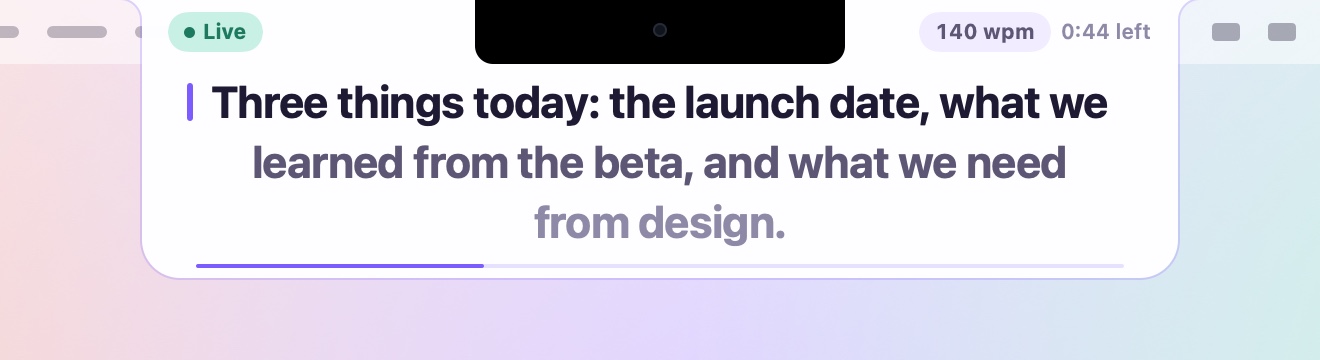
The Light card: white with dark text.
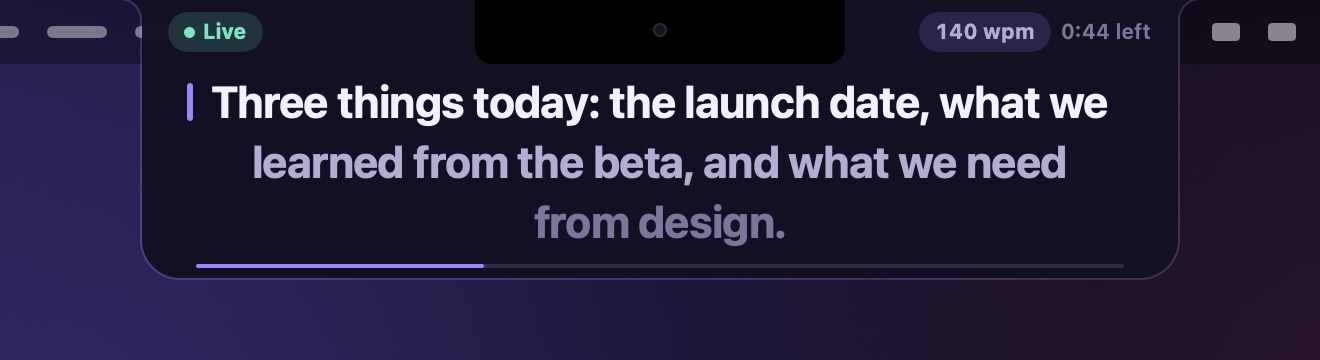
The Dark card: deep violet-black with light text.

Private

Your words stay on your Mac.

Voice listens only while you use it, and nothing is recorded or kept. TopCue asks for the microphone and speech recognition the first time you choose Voice, and Auto and Manual never use them.

  • Recognised on the MacSpeech never leaves it, and Voice never switches to recognising online.
  • No accountNo sign-up, no tracking, no analytics.
  • No internet accessThe app has no permission to use the network at all.

The details.

Everything TopCue 1.0 does, in one place.

Where it sits
In the notch, right under the camera. On a screen without a notch, at the top centre, under the menu bar.
Lines
Two to four, with the text size, width and line spacing set to suit your eyes.
Look
Light card or Dark card.
Scrolling
Voice, Auto (60 to 260 words a minute) or Manual.
Voice
Speech recognised on the Mac. Waits when you pause. Text in [square brackets] is shown, never expected.
Countdown
An optional 3-2-1 before each take.
Hot keys
Control-Option-Space to start or pause, the arrow keys for the pace and the lines, from any app.
Scripts
A library on your Mac. Import .txt, .md, .rtf and .docx files.
Privacy
No account, no tracking, no internet access.
Requirements
macOS 14 Sonoma or later. Apple silicon and Intel.

Questions.

What is TopCue?

A teleprompter for the Mac that hangs from the notch, right under the camera. It scrolls by your voice, at a steady pace, or by hand, so you can read a script on a call or a recording while looking close to the lens.

Does my voice leave the Mac?

No. Voice uses speech recognition that runs on the Mac, and TopCue has no internet access at all. Nothing is recorded or kept. If your language can’t be recognised on the device, Voice says so and you can use Auto or Manual.

My Mac has no notch. Does it work?

Yes. On a screen without a notch, the prompter hangs from the top centre, just under the menu bar. You can also choose another display in Settings.

Will people see the prompter if I share my screen?

If you share your whole screen, assume they will. Share a single window instead: most call apps let you pick one, and the prompter stays out of it.

Can I use it in a dark room?

Yes. Choose the Dark card in Settings › Prompter › Theme: the same card in a deep violet-black with light text.

More on the support page.

Ready when you are.

A teleprompter in the notch, coming to the Mac App Store. No account, no sign-up, no internet access.

Coming soon to the Mac App Store

macOS 14 Sonoma or later · Apple silicon and Intel